 By worldbusinesstoday.team@gmail.com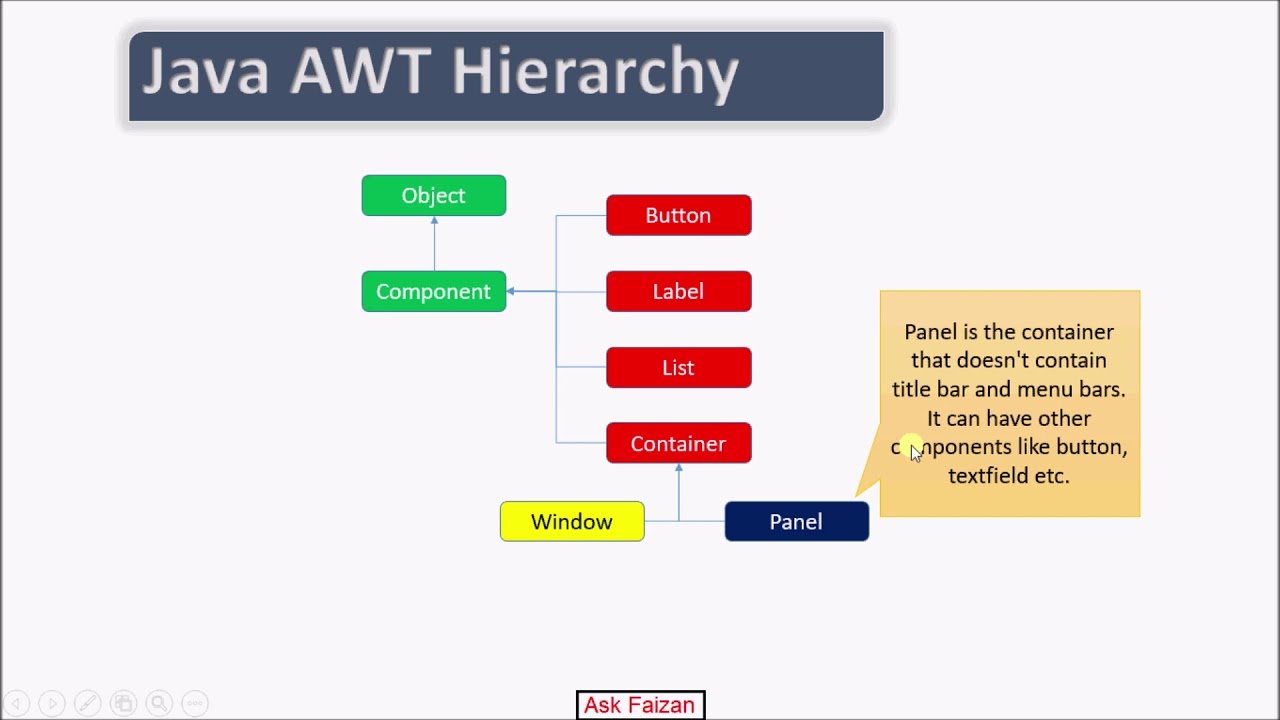
Awt components in Java has long been a powerful language for building cross-platform applications, and one of its earliest tools for creating graphical user interfaces is the Abstract Window Toolkit, commonly known as AWT. Although modern developers often prefer newer frameworks, AWT stil plays an important role in understanding the foundations of Java GUI development.
This detailed guide explores AWT components in Java, their types, features, and how they are used to create interactive applications. Whether you are a beginner or an experienced programmer revisiting core concepts, this article will help you understand AWT in a clear and practical way.
What Is AWT in Java
The Abstract Window Toolkit is a collection of classes used to create graphical user interfaces in Java. It provides the basic building blocks needed to design windows, buttons, text fields, and other UI elements.
AWT is platform dependent, which means it relies on the native system of the operating system to render components. This gives applications a look and feel that matches the host system.
Key Features of AWT
Before diving into components, it is useful to understand what makes AWT unique:
- Platform dependent rendering
- Lightweight learning curve
- Direct interaction with system resources
- Event-driven programming model
- Basic set of GUI components
These features make AWT a foundational technology for Java GUI development.
What Are AWT Components
AWT components are the visual elements that make up a graphical interface. These components are used to create windows, handle user input, and display information.
Every AWT component is a subclass of the Component class. They are placed inside containers, which manage their layout and organization.
Types of AWT Components
AWT components can be broadly divided into two categories:
- Basic controls
- Containers
Let’s explore each category in detail.
Basic AWT Controls
Basic controls are the interactive elements that users interact with directly.
Label
A Label is used to display a short piece of text in a window. It is not editable by the user.
Key Uses:
- Display instructions
- Show field names
- Provide static information
Button
A Button is used to trigger an action when clicked.
Key Uses:
- Submit forms
- Start processes
- Execute commands
Buttons are one of the most commonly used AWT components in applications.
Containers in AWT
Containers are special components that can hold other components. They help organize the layout of the interface.
Frame
A Frame is a top-level window with a title bar and borders. It acts as the main window of an application.
Key Uses:
- Main application window
- Hosting other components
Panel
A Panel is a container used to group components together inside a window.
Key Uses:
- Organizing layout
- Grouping related elements
Dialog
A Dialog is a pop-up window used for user interaction.
Key Uses:
- Alerts
- Confirmation messages
- Input requests
Window
A Window is a top-level container without borders or menu bars.
Key Uses:
- Splash screens
- Custom pop-ups
Layout Managers in AWT
Layout managers control how components are arranged inside containers. They ensure that the interface looks organized and responsive.
Common Layout Managers
- FlowLayout
- BorderLayout
- GridLayout
- CardLayout
- GridBagLayout
Each layout manager has its own way of positioning components, allowing developers to create flexible designs.
Event Handling in AWT
AWT follows an event-driven model. This means the program responds to user actions such as clicks, typing, or mouse movement.
Common Events
- Action events
- Mouse events
- Key events
- Window events
Event handling is done using listeners, which detect and respond to user interactions.
Advantages of AWT
AWT offers several benefits, especially for beginners:
- Simple and easy to learn
- Direct use of native system components
- Faster performance in some cases
- Strong foundation for GUI concepts
Limitations of AWT
Despite its advantages, AWT has some drawbacks:
- Platform dependent behavior
- Limited set of components
- Less flexible design compared to modern frameworks
- Outdated look and feel
Because of these limitations, many developers prefer newer libraries.
AWT vs Swing
Swing is another Java GUI framework that improves upon AWT.
Key Differences
- AWT uses native components, while Swing is platform independent
- Swing provides more advanced components
- AWT has a basic design, while Swing offers a richer interface
However, learning AWT helps in understanding how GUI systems work at a fundamental level.
Real-World Applications of AWT
Although not widely used in modern applications, AWT still appears in:
- Legacy systems
- Simple desktop tools
- Educational projects
- Basic GUI prototypes
It remains an important part of Java’s history and ecosystem.
Best Practices for Using AWT
If you plan to work with AWT, consider these tips:
- Keep interfaces simple
- Use layout managers effectively
- Separate logic from UI code
- Handle events carefully
- Test across different platforms
These practices help improve usability and maintainability.
Future of AWT
While AWT is no longer the primary choice for GUI development, it still serves as a foundation for understanding Java interfaces. Modern frameworks like JavaFX offer more advanced features, but AWT remains relevant for learning and maintaining older systems.
Conclusion
AWT components in Java provide a fundamental way to build graphical user interfaces. From basic controls like buttons and text fields to containers like frames and panels, AWT offers all the essential tools needed to create simple applications.
Even though newer technologies have taken its place in modern development, AWT continues to be an important learning tool. By understanding its components, layout managers, and event handling system, developers gain a solid foundation in GUI programming.
Whether you are building a small project or exploring Java’s history, AWT gives you valuable insight into how graphical interfaces are designed and implemented.